
Archicad costs between $201 and $237 per month in 2026, depending on which of the two subscription plans you choose and assuming you pay for a full year upfront. Month-to-month is steeper, $345 to $406.
Perpetual licenses are gone either way. Graphisoft phased them out at the end of 2024 for new customers and at the end of 2025 for existing ones, which means subscription is now the only way in.
For solo architects and small studios, that's real money. And it's before you've added an Archicad rendering tool or any of the other software you actually need to deliver a project. Here's the full pricing picture, what you're getting at each tier, and whether it's worth it given what else is on the market in 2026.
Archicad pricing is broken into two plans: Archicad Studio and Archicad Collaborate. Both include the full Archicad BIM modeling software, BIMx Pro for project presentations, and access to Graphisoft's AI Visualizer. The main difference is how your team collaborates.
| Archicad Studio | Archicad Collaborate | |
|---|---|---|
| Monthly cost | From $201 + tax | From $237 + tax |
| Annual cost | $2,414 + tax / seat | $2,840 + tax / seat |
| Collaboration | BIMcloud Basic (local) | BIMcloud SaaS (cloud) |
| MEP tools | No | Yes |
| Floating licenses | Yes | Yes (+ cross-company) |
Archicad Studio is the better fit for solo practitioners and small firms that work locally. You get the full Archicad modeling toolset plus BIMcloud Basic for office-based teamwork. The Archicad license cost at this tier is competitive for what you get, especially compared to Revit.
Archicad Collaborate adds cloud-hosted BIMcloud, MEP design tools, and portable licenses for cross-company projects. If you're running distributed teams or need to share models with external consultants, this is the plan you want. Of course, the Archicad subscription cost is higher here, as it reflects the cloud infrastructure and expanded collaboration features.
Also important pricing-wise is that both plans use floating licenses, so your team can share seats across multiple machines (though not always simultaneously). Graphisoft will be rolling out more frequent software updates for subscribers, which is another tangible benefit over the old perpetual model.
The subscription price is just one piece of the puzzle. Consider also these in your calculations if you want to estimate the total Archicad cost for your firm:
If you're weighing Archicad pricing against other BIM tools, here's how the annual costs compare side by side:
| Software | Cost | License Type | Platform |
|---|---|---|---|
| Archicad Studio | $2,414/yr | Subscription only | Win + Mac |
| Archicad Collaborate | $2,840/yr | Subscription only | Win + Mac |
| Revit | $3,005/yr | Subscription only | Windows only |
| Rhino 8 | $995 (one-time) | Perpetual | Win + Mac |
| AutoCAD | $2,095/yr | Subscription only | Win + Mac |
As you can see, Archicad pricing is slightly lower than Revit's annual rate, plus you get native macOS support, which Revit still doesn't offer. For Mac-based firms, that alone makes the choice a no-brainer. If you're comparing between these two tools, read our side by side Archicad vs Revit comparison.
Rhino is the outlier here. At $995 for a perpetual license with no recurring fees, it's by far the most affordable long-term option. But then again, Rhino isn't a BIM tool. It's primarily a 3D modeler that does not natively provide the same BIM-centric documentation and collaboration stack as Archicad or Revit.
AutoCAD, as the cheapest subscription option, is primarily a 2D/3D drafting tool without the BIM capabilities that Archicad and Revit provide. AutoCAD doesn't provide the BIM capabilities that Archicad and Revit do.
Compared to the competition, Archicad lands in the mid-to-high range on sticker price. Factor in Mac support, IFC/BCF interoperability, and the collaboration stack, and the value holds up.
One area where Archicad users consistently look for alternatives is rendering. CineRender, Archicad's built-in CPU renderer, produces decent results but is slow on complex scenes. GPU-accelerated rendering is available through Redshift (added in Archicad 25+), though it requires an NVIDIA GPU. Users on the Graphisoft Community forum regularly report render times of 1–3+ hours for a single high-resolution image. What's worse, with the process locking up their workstation in the meantime.
If speed matters to your practice, MyArchitectAI is the most efficient rendering tool for Archicad users. It generates photorealistic visuals from your Archicad exports in under 10 seconds, directly in your browser. No GPU upgrades or installs needed.
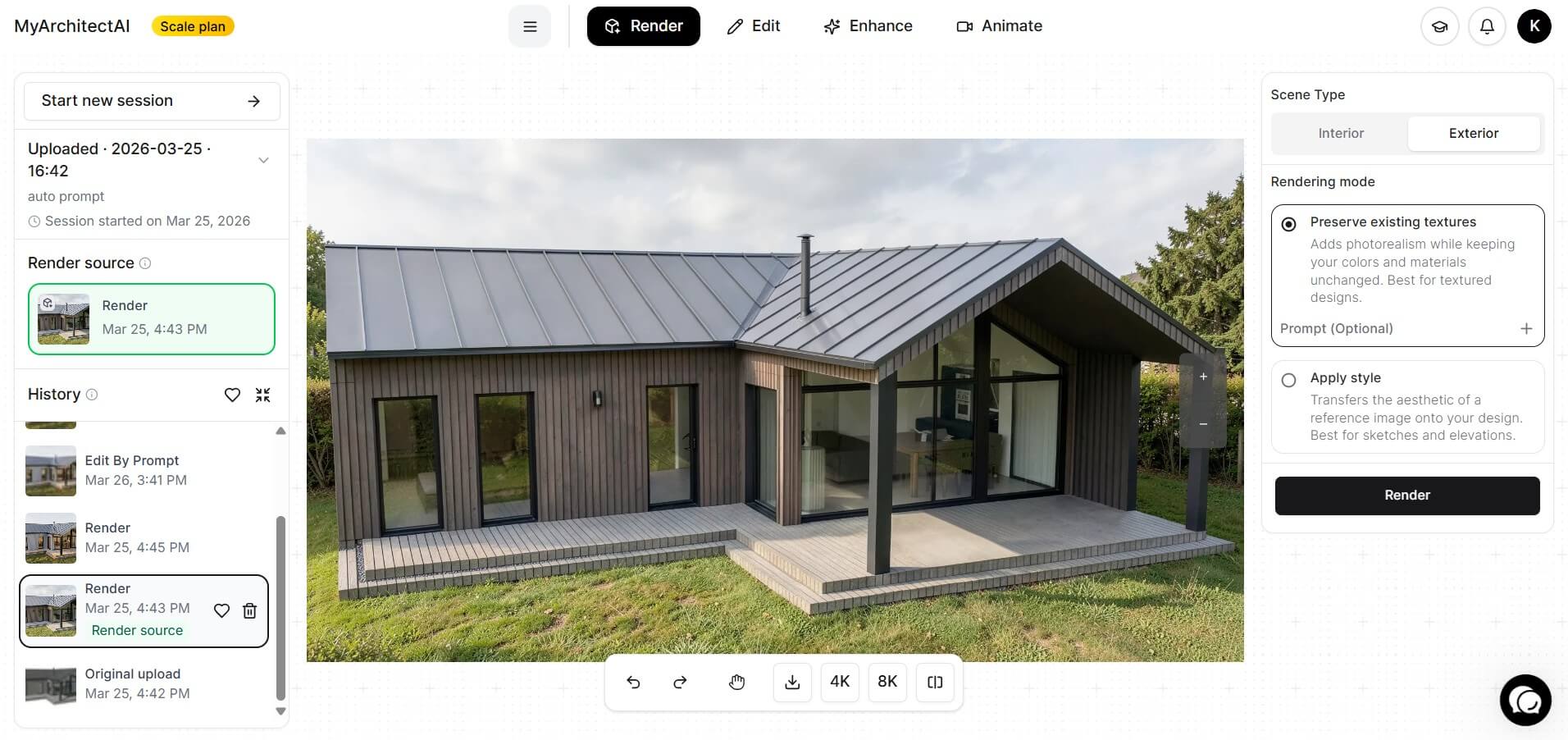
This AI-powered tool handles all lighting and texturing automatically, so there's essentially zero learning curve. You upload an image of your Archicad model, adjust a few settings, and get a client-ready render back in seconds. If something needs changing, just describe the edit in words (e.g., "swap the facade material to exposed brick") and MyArchitectAI regenerates only that part, almost instantly.
Because it runs entirely in the cloud, it works on any device and any operating system. That means you can render on the same MacBook you're running Archicad on, not worrying about hardware bottlenecks.
For firms already investing in Archicad pricing, adding MyArchitectAI at $29/month for unlimited renders is a fraction of the cost of traditional rendering plugins, which also saves you hours per project.
If you want to compare the two approaches, read our full guide on how to render in Archicad.
For architecture firms that value design flexibility with OpenBIM workflows, plus Mac compatibility, Archicad pricing delivers solid value in 2026. The Studio plan at $2,414/year per seat is competitive with Revit, and the Collaborate plan's cloud-based teamwork features justify the premium for distributed teams.
The main caveats are the lack of a perpetual license option going forward and the rendering bottleneck with CineRender. If fast, high-quality visuals are important to your workflow (and they usually are), pairing Archicad with a tool like MyArchitectAI can save your team significant time and money compared to traditional rendering setups.
Whatever you decide, take advantage of Graphisoft's 30-day free trial to test the software hands-on before committing to a subscription.
Not for commercial use. Graphisoft offers a free 30-day trial with full feature access, so you can test the software before committing. There's also a free educational license for students and faculty at recognized institutions, but it can't be used on professional projects and includes a watermark on all outputs.
Not anymore. Graphisoft phased out perpetual licenses at the end of 2025. Starting in 2026, all new Archicad licenses are subscription-based (Archicad Studio or Archicad Collaborate). Existing perpetual license holders can continue using their software, but it won't receive updates. Graphisoft is running a conversion program through March 2027 for legacy users who want to switch to a subscription with favorable terms.
It depends on your workflow and team setup. Archicad runs natively on macOS and Windows, has a more intuitive interface for architects, and offers strong OpenBIM interoperability. Revit has deeper integration with other Autodesk products, a larger market share (especially in the US), and more robust structural and MEP toolsets. In terms of Archicad pricing vs Revit pricing, they're close, though Revit edges out slightly more expensive on annual subscription cost. Many small-to-mid-size firms prefer Archicad for its design-first approach and lower learning curve.
These two tools serve different purposes. SketchUp is a 3D modeling tool, quick to learn and great for conceptual design and visualization. Archicad is a full BIM platform built for detailed architectural modeling + documentation, and collaboration. Some firms use both, depending on the workflow.

