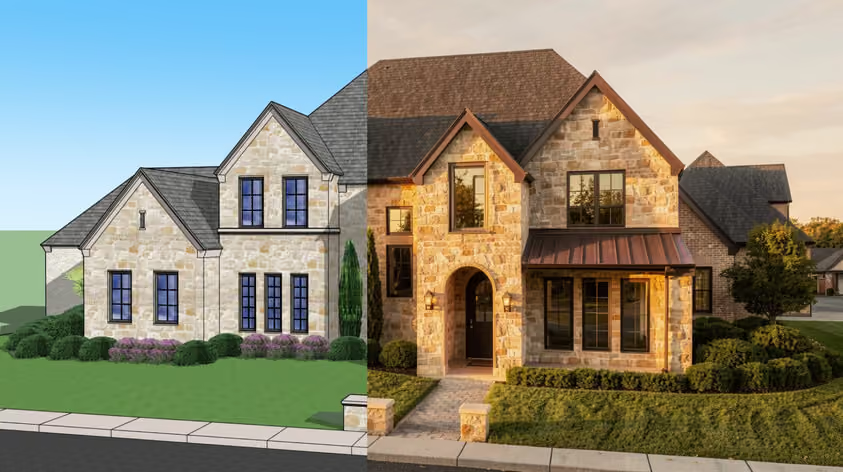
D5 can produce great architectural visuals, even if it sometimes takes a long time to prepare perfect scenes. But if your graphics card struggles with your projects, or you need a different way to present designs, another renderer may fit your work even better. The real question is which one, since the best D5 Render alternatives all solve different problems.
Twinmotion is worth checking when licensing costs are the issue. Enscape keeps visualization close to your modeling workflow, while V-Ray gives you more control over final images. And then there’s also MyArchitectAI, which helps you produce stills on virtually any hardware, including machines that struggle with a local rendering engine.
Below, you'll find seven options, their current pricing, and practical advice on which ones deserve a place on your shortlist.
Before you compare D5 Render alternatives, identify what you actually need to change; otherwise a different interface won't help.
If operating-system compatibility is your main concern, our rendering software for Mac guide covers that separately.
Use this table to narrow the field before reading every entry. Prices below are the dollar prices each vendor displayed in November 2026. Annual subscriptions are billed upfront; taxes and regional prices may vary.
Good to know: Twinmotion's free eligibility concerns business revenue, not the value of an individual project. Access to Twinmotion Cloud requires a paid seat. Unreal Engine has separate rules for seat-based work and distributed applications, covered below.
Best for: Architects and design teams who need presentation images quickly and want to avoid buying rendering workstations.
If you mainly use D5 to turn selected SketchUp views into visuals for the client, you may not need another full 3D rendering application. MyArchitectAI works from an image exported from your design software. Upload a JPG or PNG, optionally describe the result you want, and generate a realistic view, typically in under 10 seconds.
The rendering happens on cloud GPUs. Your computer still handles the browser and your source design work, but it doesn't need to run a demanding local rendering engine. You can use it on Windows or macOS, and access it from other devices with a compatible browser and internet connection.
For a practice where several architects need visuals, that means a person developing the model can generate a view for a client discussion, even when the office's dedicated visualization workstation is occupied.
The workflow is also easy to pick up; no need to learn manual lighting setups or tune render settings before getting your first image. The AI engine handles realism automatically. Your effort thus goes into choosing a useful source view and checking the result against the design.
There is a clear boundary, though. MyArchitectAI is not a real-time walkthrough or VR engine. Check details such as window divisions, signage, fixtures, and specified finishes before issuing an image to a client. If a review depends on exact geometry across several viewpoints, keep a model-based renderer in the workflow.
The official subscription guide lists Starter at $29/month or $290/year for one seat. Studio costs $49/month or $490/year. Team includes five seats for $99/month or $990/year. All three tiers include unlimited renders and commercial usage rights, while download resolution, storage, and animation allowances vary.
Put MyArchitectAI first among your D5 Render alternatives when your bottleneck is producing stills before a deadline. Test it with a typical project image, including the details your clients tend to question. For live navigation, choose one of the real-time options below.
Try MyArchitectAI's AI rendering for free
Best for: Practices that want a familiar real-time architectural visualization workflow and qualify for free commercial use.
Twinmotion is a sensible first trial if you want software like D5 Render with a different licensing model, where you can still work with a 3D scene, prepare views, and produce architectural presentations. If your team is already comfortable with real-time rendering, it's a closer replacement than an image-based AI tool.
SketchUp users can bring models across through Epic's Datasmith Exporter plugin, which supports Direct Link synchronization. That helps when the design changes, although you should still test material assignments and model organization on your own files.
The financial case is particularly strong for smaller firms. Epic makes Twinmotion free for businesses below its $1 million revenue threshold, including commercial work.
Hardware remains a separate question, however. Twinmotion is a local 3D application, so a free license doesn't make it suitable for every laptop. Its hardware requirements distinguish between project sizes and rendering features. The Path Tracer currently requires Windows and a supported graphics card with at least 8GB of dedicated video memory.
If your D5 projects already exceed your workstation's capacity, test the same scene in Twinmotion before assuming the switch will fix performance. Compare the output you actually need, not just how quickly an empty scene opens.
Under Epic's licensing terms, Twinmotion is free for eligible businesses that made less than $1 million in revenue over the previous 12 months. Paid seats cost $445 per year for businesses above the threshold and anyone requiring Twinmotion Cloud.
Shortlist Twinmotion when license cost is your main reason for leaving D5, and you still need a model-based presentation workflow. For a closer look at the differences, see our D5 Render vs Twinmotion comparison.
Best for: Architects who want to visualize changes during everyday design work.
Enscape works inside supported applications, including SketchUp, Revit, Rhino, Archicad, and Vectorworks. Its appeal is the short path between changing your design and seeing the result. D5 also offers synchronization plugins, so whether to switch depends on how Enscape fits your workday. You can, for example, review a room while adjusting the source model, which suits internal design meetings and client discussions.
Confirm support for your exact host version and operating system before installing it across the office. It also needs suitable graphics hardware.
Enscape Solo costs $574.80 per year, advertised as $47.90/month with annual billing. Higher plans add features and allowances.
Include Enscape among your D5 Render alternatives when plugin workflow is the deciding factor. Trial it through a design revision and presentation, then compare how much preparation each tool requires.
Best for: Teams producing exterior views where planting, site context, and camera movement account for much of the work.
Lumion Pro deserves attention when your render isn't finished once the building looks right. Check it if your projects often need planted courtyards, streets, surrounding terrain, and a sequence showing how the scheme meets its site.
Lumion's landscape tools include terrain editing and ways to populate surfaces or selected areas with vegetation, and its nature library supports ray tracing. These features are worth testing if your team spends substantial time building the setting around imported architecture.
That said, D5 also has tools for assembling environments, so the useful comparison is practical: can your team build the required site faster, and does the available planting suit the project? An extensive library has limited value if you replace most of its contents with project-specific assets.
Also, this is not an obvious cost-saving switch, so consult Lumion's system requirements before committing. If hardware is the reason you're comparing D5 Render alternatives, resolve that question before spending time learning the scene tools.
The manufacturer's pricing page lists Lumion Pro at $1,149 for one year with a named-user license. Pro Floating costs $1,499 for one year and allows a seat to be shared across a team, subject to availability.
Choose Lumion for the time it can save on exterior presentation work. Try a representative landscape section during the trial; include a sloping surface, a planting bed with irregular boundaries, and one camera move. You'll get a better sense of the workflow than you would from a polished demonstration scene.
Best for: Visualization specialists producing close-up interiors, competition images, or marketing visuals with demanding material requirements.
V-Ray for SketchUp lets you develop final images from your SketchUp model while taking more control over how the scene is rendered. It's worth considering when a broad material approximation isn't enough for the brief and you need to fine-tune, for example, the appearance of a translucent screen or reflections across several finishes. In such situations, the ability to refine can matter more than getting the first preview quickly.
Chaos's Light Mix documentation explains how you can change light intensity and color during or after rendering when you've added the relevant render element beforehand. That gives you room to refine an image's balance after the initial calculation.
V-Ray also offers both CPU and GPU rendering options. CPU rendering can be useful if your graphics card is unsuitable for D5, although render time and available system memory still matter. Check feature support for your chosen engine; the two modes aren't identical.
There's a useful practice example in Chaos's CPL case study. CPL uses Enscape during design and V-Ray for final production. Discussing a healthcare lobby, Creative Labs director Danny Jones said V-Ray provided “better translucency and better bouncing of lighting.” That is a specific reason to use a more controllable renderer on a particular image.
Expect to spend time learning the settings and developing materials. V-Ray can reward that investment when someone in the studio owns visualization production. It makes less sense to give every project architect an unfamiliar renderer right before a submission.
V-Ray Solo costs $540 per year, advertised as $45/month with annual billing. Check the current plan's licensing terms and included products before assigning seats across a team.
Choose V-Ray from your D5 Render alternatives when you can identify a recurring image-quality problem that needs more control. Test that exact problem during the trial, including the time needed to reach an approved result.
Best for: Studios prepared to develop a dedicated visualization workflow around free software.
Blender is a good choice when you want to sidestep the hassle of subscription. Its license permits commercial work, and the images you create belong to you. For a practice trying to build an internal visualization capability, that makes the software cost straightforward.
Blender’s Cycles renderer supports CPU rendering and GPU acceleration through supported hardware platforms. It also gives you tools to edit geometry within the same application, so your visualizer can refine an imported model for a particular camera view.
However, switching from SketchUp and D5 to Blender changes more than just your renderer. Every project needs to make the trip from SketchUp into Blender, and you'll have to deal with any geometry or material assignments that don't transfer correctly.
Revisions deserve particular attention, and this is where the real cost becomes apparent. Make a few changes to the original SketchUp model and import it again. Can you update the geometry while keeping your Blender materials, lighting, and camera setups, or will you have to redo some of that work? If your architects revise designs frequently, even 30 minutes of extra work per revision adds up.
Blender is free, including commercial use. Budget separately for any paid add-ons, assets, training, or external rendering services you decide to use.
Shortlist Blender when removing license fees matters more to you than a quick setup. Someone on your team will also need to establish a consistent way to handle imports and updates. Make sure to save the export settings that work, document common problems, and prepare a reusable Blender scene. Otherwise, every new employee could end up spending hours figuring out a process someone else has already solved.
Best for: Visualization teams building configurators or presentations with project-specific interactions.
Unreal Engine gives you room to build more ambitious presentations, e.g. for developments where buyers can browse available apartments and switch floor plans before making a decision. You can build the entire experience around the project, including the interface clients use to explore it.
Zaha Hadid Architects' real-time configurator shows that kind of brief, illustrating a presentation product developed around architectural choices. A short case study by Epic describes a system for exploring plots and configuring housing options, interior layouts, and roof types.
For your studio, the decision starts with reuse. If a developer needs one standard walkthrough, the extra development may be difficult to justify over a real-time renderer such as D5. If the same presentation system will support many units or repeated design reviews, a dedicated interactive workflow becomes more plausible.
Epic's SketchUp Datasmith documentation covers importing SketchUp scenes and using Direct Link. That helps bring the design into Unreal, but it doesn't build the interaction for you, so allow time for scene preparation and testing.
Specify who maintains it, too. Changes to the model, available options, or target device can all require another testing pass. Someone needs to own that work after the first presentation is delivered.
Epic's license offers free use for eligible businesses below $1 million in annual gross revenue. For relevant commercial work above that threshold, seats cost $1,850 per year. Applications distributed to third-party end users may fall under different, royalty-based terms; check your intended deliverable before quoting.
Shortlist Unreal when interactivity is part of the commission and your team has time to build it. For routine presentation stills, other alternatives to D5 Render involve less setup.
Here’s a brief overview to help you decide.
Start with MyArchitectAI if you need still images and want rendering handled remotely. If you need locally rendered images from a 3D model, investigate V-Ray CPU or Blender Cycles CPU, then benchmark actual turnaround times.
Don't assume another real-time renderer will rescue an overloaded workstation. Test your largest typical scene before purchasing a license.
D5 and Lumion Pro both require Windows. If part of your team works on another system, MyArchitectAI runs in a browser, and Twinmotion and Blender are available for macOS as well as Windows. Platform support can still vary by feature (Twinmotion's Path Tracer is Windows-only, for example), so check the requirements for the tools you actually rely on.
Check Twinmotion's commercial eligibility first. Blender is another option if your team can absorb the training and model-transfer work. Compare the first year of use, including paid staff hours, before deciding which is cheaper.
Try Enscape in your current host application. Check version support first, then run a normal design meeting with it. The useful measure is how quickly you can answer a design question after changing the model.
Put V-Ray on your shortlist for detailed control over final images. Use an approved project as the test: match a specified finish, resolve a difficult reflection, and record the work involved. Choose based on that result, not a vendor gallery alone.
For a handful of presentation images on a deadline, trial MyArchitectAI. For continuous navigation during a review, test Enscape or Twinmotion on suitable hardware. These are different tasks, so measure speed against the deliverable your client expects.
Keep your final shortlist to two D5 Render alternatives. Give each the same source model or view, make one realistic client revision, and compare the total time to an acceptable result.
Need visuals for your next project? Try MyArchitectAI's AI architectural rendering with a view from your current model.