If you have spent any time on a job site, you already know the pattern. Projects slip, budgets stretch, and the paperwork piles up faster than a permit office can turn a "simple approval" into archaeology. So when people talk about construction AI fixing all of that overnight, it is fair to be skeptical.
We build AI tools for architects, so we pay close attention to what this technology does well and where it still falls short. This guide covers the practical side of construction AI: what it is, where it already works, the tools worth knowing, and where the industry is heading.
AI construction software handles tasks a person would normally do by hand, and it works by spotting patterns in data and acting on them. In more tangible examples, construction AI tools can classify elements in drawings, identify rooms, walls, doors, and windows, analyze documents, flag schedule risks, speed up takeoff, detect hazards in site photos, and more.
It helps to separate AI from the technology around it. Conventional automation follows fixed rules someone wrote. BIM is a structured building model that AI can work with, but BIM itself is not AI (see our guide to AI in BIM). Computer vision is the branch of AI that interprets images. Robotics is the physical side; most tools here are software that supports people.
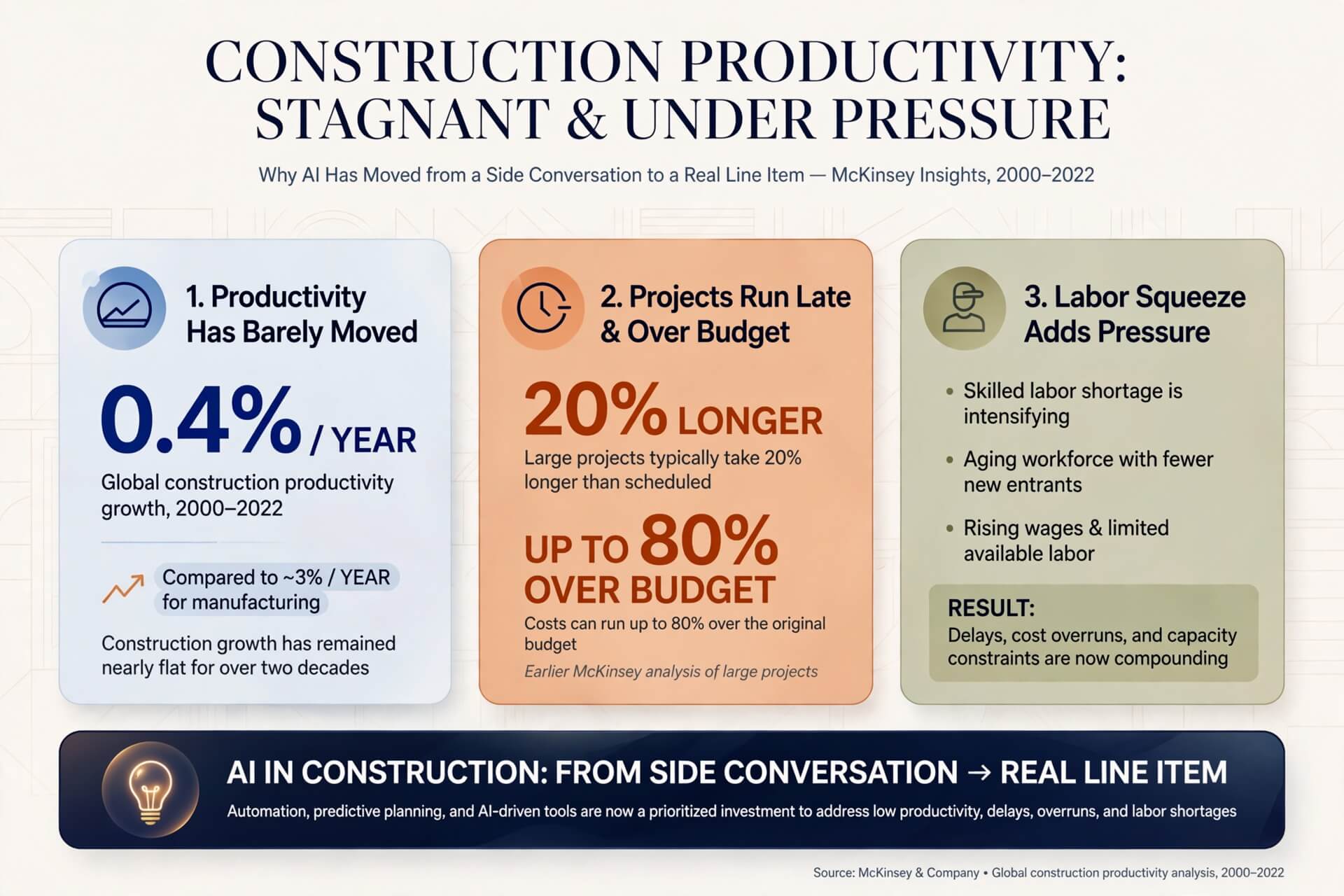
Construction productivity has barely moved. McKinsey found that global construction productivity grew just 0.4% a year between 2000 and 2022, compared with about 3% a year for manufacturing. An earlier McKinsey analysis found that large projects typically take 20% longer than scheduled and can run up to 80% over budget. Add a labor squeeze on top, and you can see why AI in the construction industry has moved from a side conversation to a real line item.
The 2025 AGC and NCCER workforce survey of nearly 1,400 US firms found that 92% of firms that are hiring have a hard time finding qualified workers, and 45% have had project delays due to shortages of their own or subcontractors' workers. AI tools do not pour concrete, but they can help stretch the people you already have by taking repetitive desk work off their plates.
Most construction AI tools cluster into a handful of jobs.
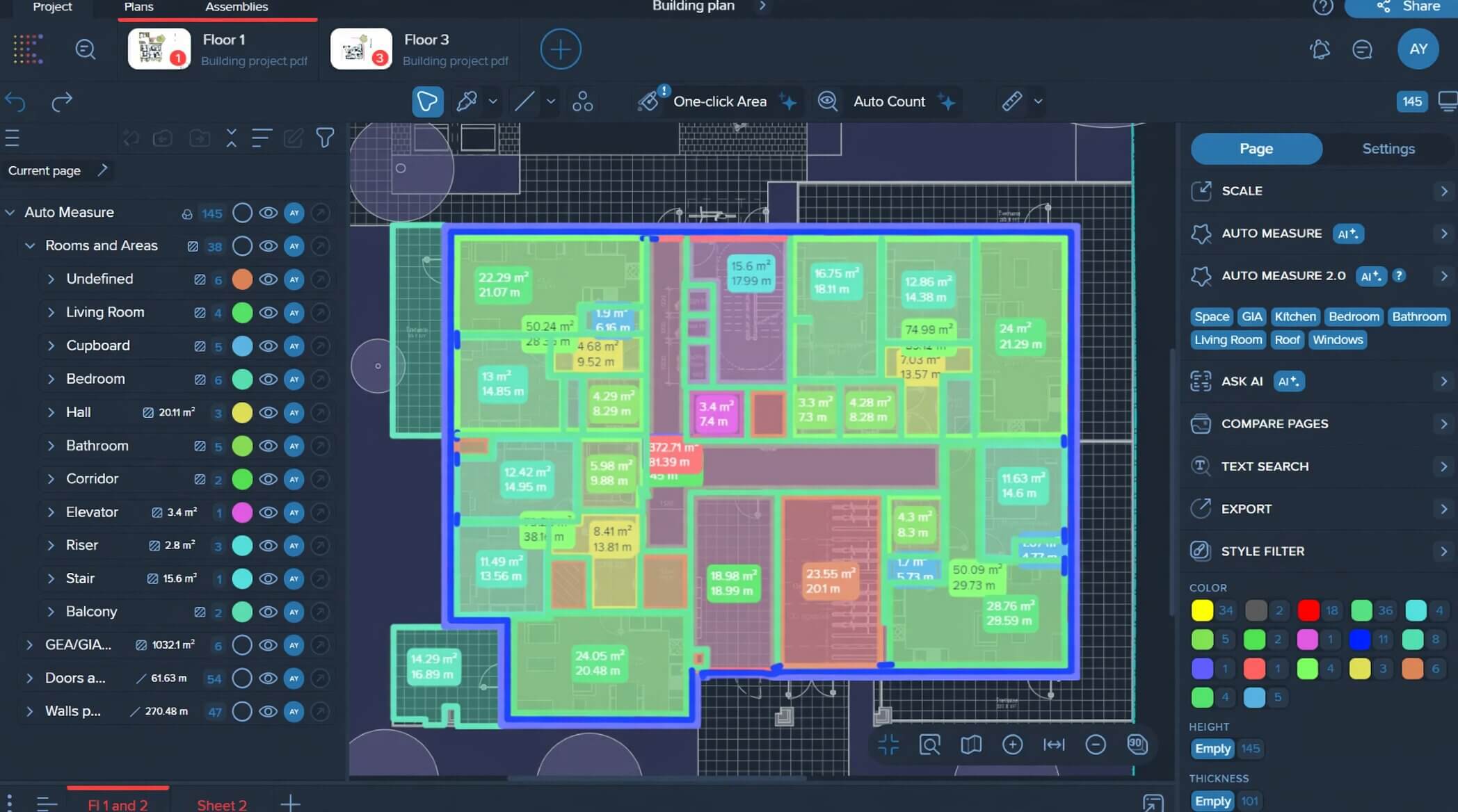
Takeoff has always been slow. Many AI construction estimating software tools use computer vision to detect drawing elements, then turn those counts into quantities. Kreo, for example, says its Auto Measure tool detects and measures rooms, walls, doors, and windows. Check the results against your drawings, but faster takeoff can change how many bids a small team can chase.
Scheduling software can now learn from large sets of past projects and flag the risks a Gantt chart hides. The role of AI in construction project management is mostly about foresight: spotting the trade clash or the supply delay before it becomes a change order. Another strength of AI in construction management is keeping field and office data in sync, so a manager can see a slip forming sooner. Either way, a forecast is only as good as the data behind it.
Computer vision platforms scan site photos for missing hard hats, unguarded edges, and other hazards. Newmetrix (formerly Smartvid.io, acquired by Oracle in 2022) trained its system, Vinnie, to recognize about 100 safety risks. In a 2019 study with Suffolk Construction that used 10 years of the contractor's photo and project data, it predicted roughly one in five safety incidents with 81% accuracy. That is an early warning, not a guarantee: most incidents were not predicted.
When plan sets are huge, details get missed. AI for construction drawings can pull schedules, classify sheets, and answer questions about a document set faster than a manual read. The role of AI in construction estimating leans heavily on this, since a clean read of the drawings is the foundation of an accurate bid.
Early in a project, construction AI helps teams generate concepts and turn rough models into realistic images in seconds, which reshapes how clients are brought into the conversation.
Design is where construction AI feels most immediate, because a client can react to the output right away. Traditionally, visualizing a design meant (and for many still means) long hours in rendering software on a powerful machine. AI construction design tools aim to close that gap, and it is exactly the problem we set out to solve.
MyArchitectAI is an AI rendering tool that runs in your browser. You upload an image exported from your CAD or SketchUp model (JPG or PNG), choose a mode, and get a photorealistic render; most still renders are ready in under 10 seconds. The core rendering engine is designed to keep your model's geometry and textures, so the render reflects what you actually designed.
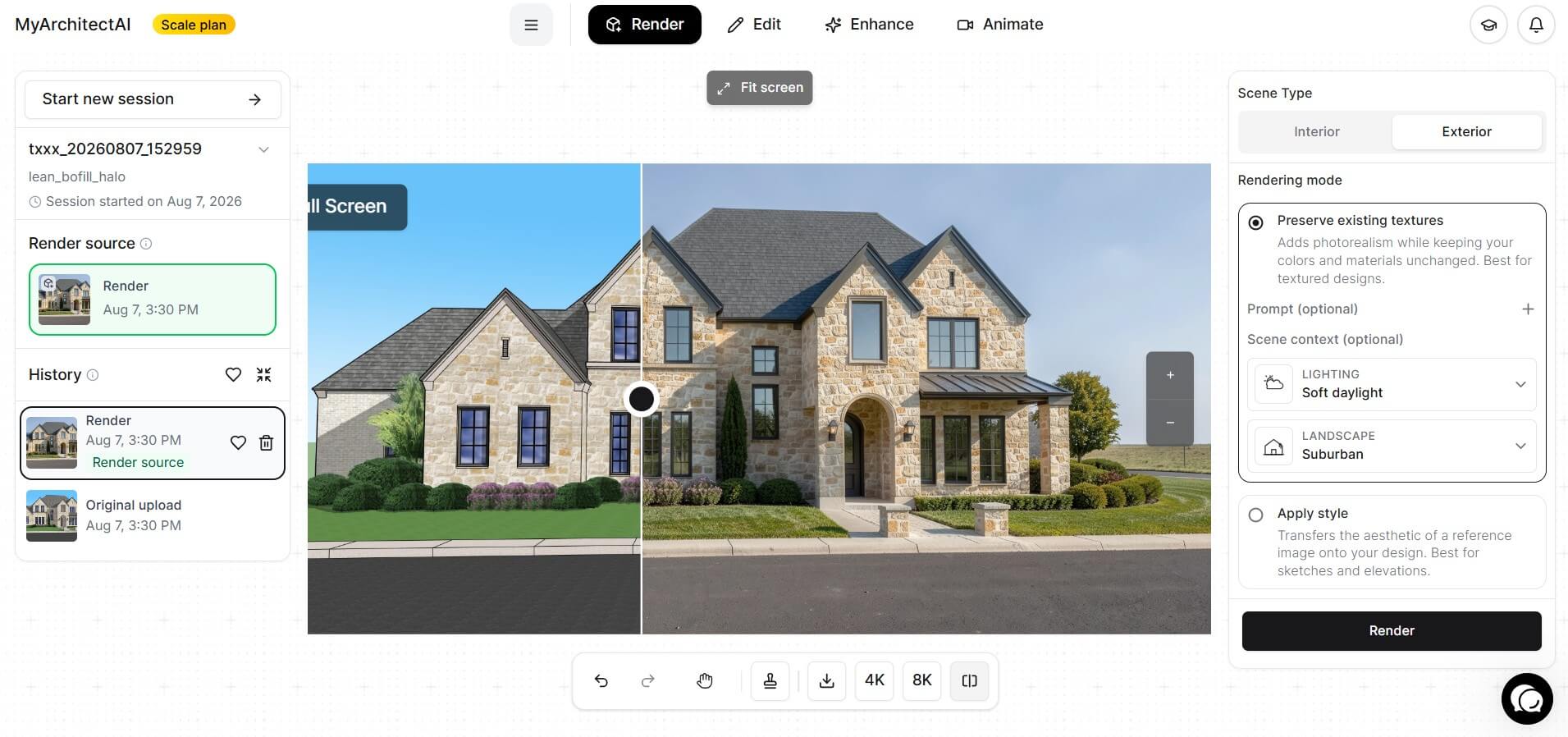
Style transfer applies the look of a reference image, which is handy when a client shares a mood board. The Render Enhancer improves low-resolution renders, and the Render Editor lets you replace materials, add or remove objects, and adjust lighting. In practice, a simple client-requested revision no longer has to wait for a full re-render.
We are clear about the boundary. An AI render is a visualization for ideation and client communication. It is not a construction document, and it does not check structure, code compliance, or buildability; that work stays in your CAD or BIM workflow with qualified professionals. For a final presentation render on a complex project, a physically based engine may still give tighter material control.
Want to see how this works on your own model? See for yourself how AI helps architects make their workflow more efficient with 10 free renders from MyArchitectAI.
Here is what teams can gain, although results depend on your data, your people, and how well the tool fits the job.
None of this removes the need for an experienced professional. A quantity, schedule forecast, or hazard flag from an AI tool still needs someone qualified to check it. Reliable results also take time: teams need clean project data and a habit of checking output, so treat the first projects as a trial.
There is no single best AI for construction, because the right pick depends on what you are trying to speed up. Below are representative tools to help you find the best AI tools for construction that fit your work. We have not tested them ourselves; details come from each vendor's published information. Expect to need more than one, since AI construction software is still a set of specialized tools.
When choosing the best AI construction takeoff software, test it against your own plan types first, since architectural, structural, and MEP sheets can behave very differently.
If you are weighing the best AI for construction estimating, start with the kind of drawings you bid. Togal.AI and Kreo detect and measure elements directly from plans. Togal.AI says it reaches 98% accuracy on floor plans. Kreo runs in the cloud and publishes lower-priced entry plans, which suits smaller firms testing the water, although its Auto Measure feature sits on a higher tier. Kreo's Caddie agent can also read drawings, run measurements, and build quantity reports.
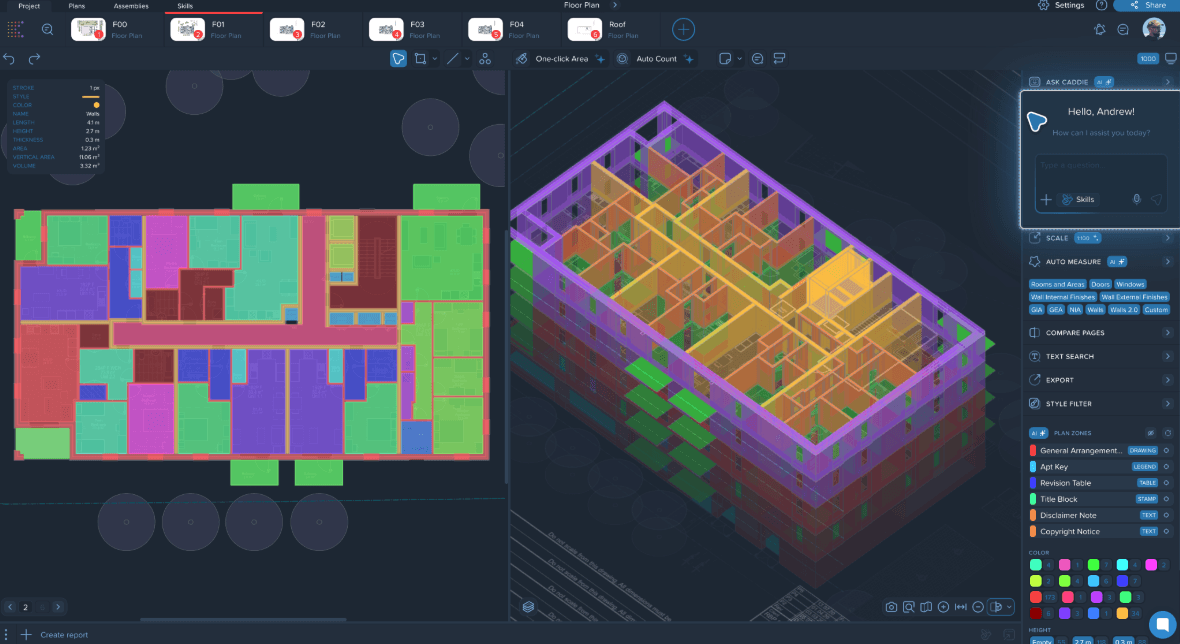
Accuracy claims come from the vendors themselves, so trial any tool on your own drawings before committing.
A practical rule of thumb: AI takeoff is easiest to justify when you bid often on fairly standard drawings. If you mostly bid a few unusual custom jobs, manual takeoff may still hold up.
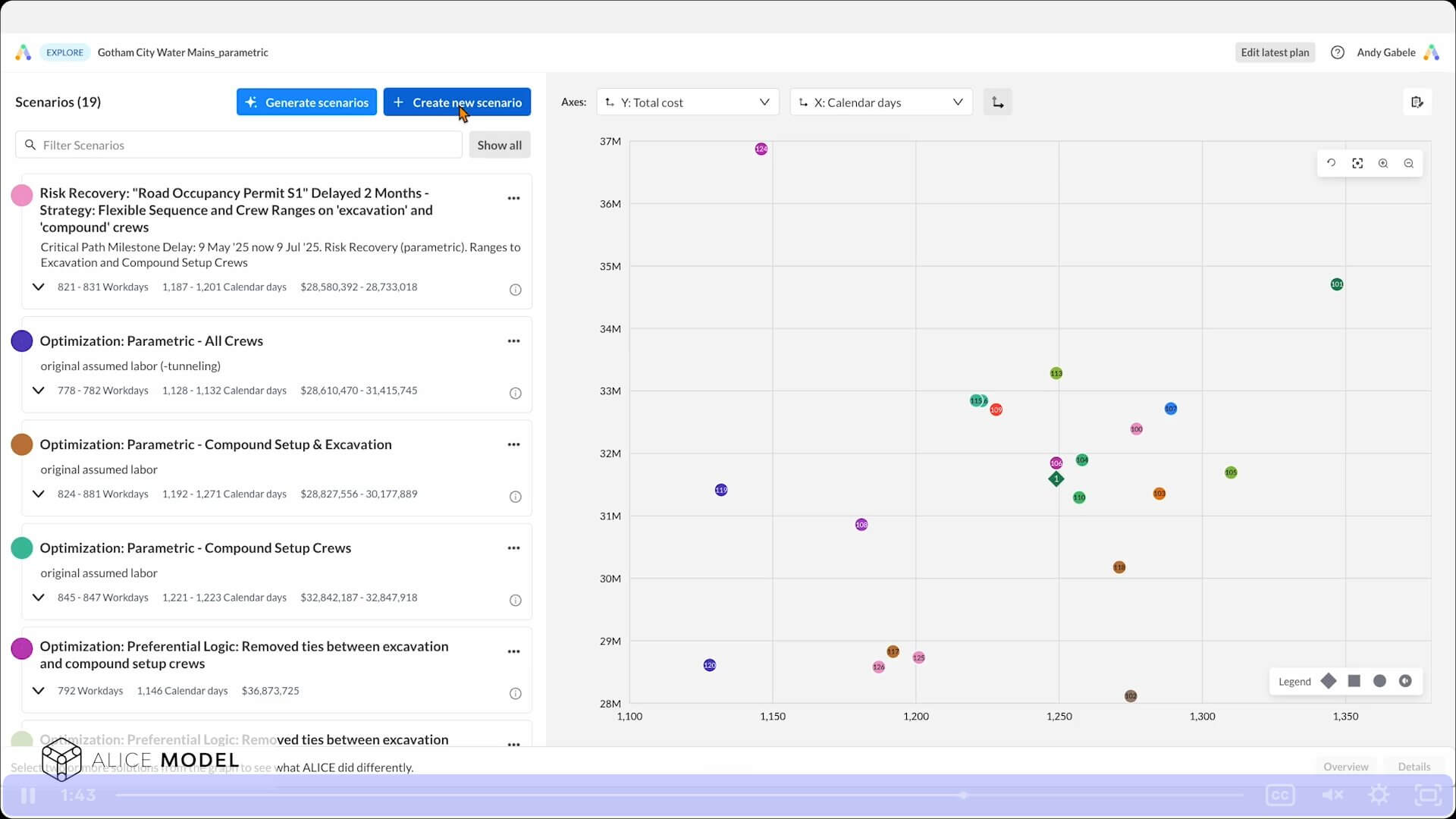
Two names stand out here for large, complex projects. ALICE helps you build a better schedule; nPlan tells you how much to trust the one you have.
ALICE Technologies, founded in 2015 on Stanford research, runs generative scheduling: it simulates millions of possible construction scenarios to find an efficient plan. nPlan uses machine-learning models trained on 750,000 historical schedules to forecast which activities and milestones are likely to slip.
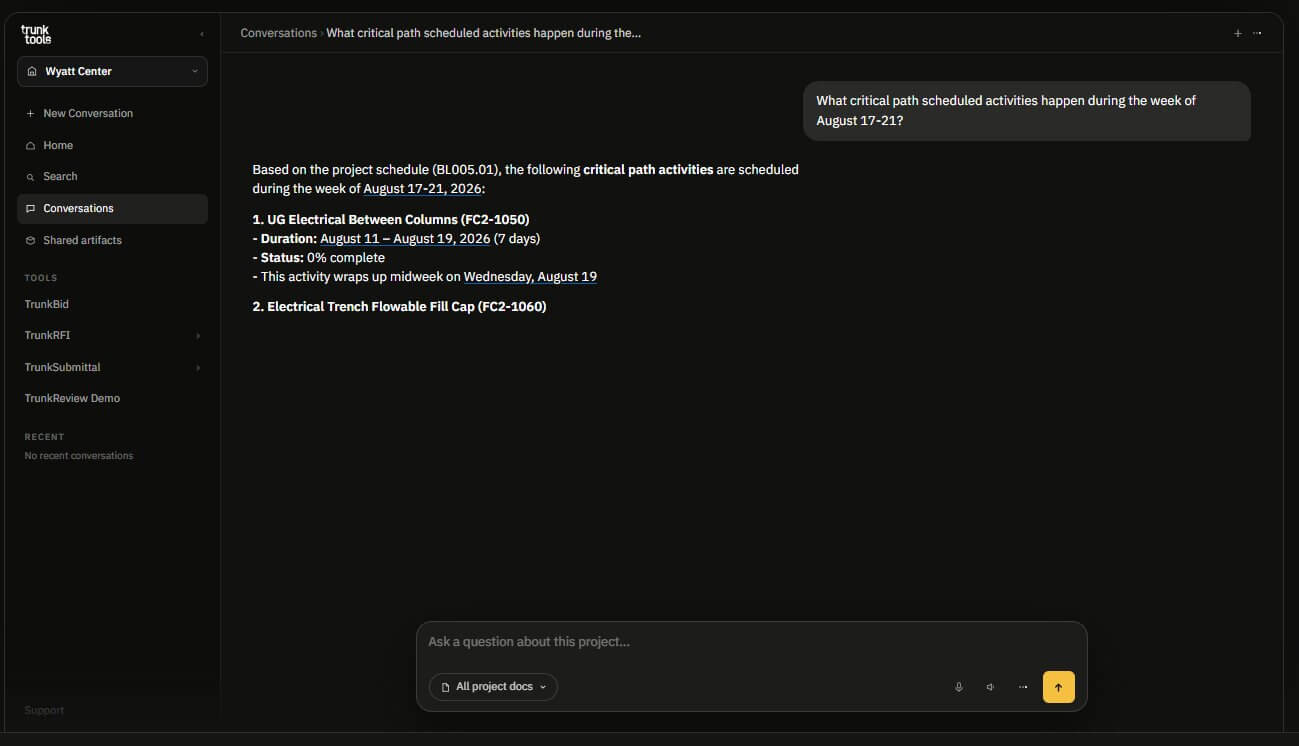
Trunk Tools does the paperwork digging for you. Its TrunkText feature lets anyone ask a question by text message, web, or Microsoft Teams and get a cited answer from the project's specs, drawings, RFIs, and submittals. TrunkSubmittal checks submittals against the specs and flags what is non-compliant for your review, and TrunkReview summarizes what changed between drawing revisions.
For contracts, Document Crunch uses its CrunchAI engine to flag risky clauses and obligations. The company reported more than 10,000 customer projects in June 2026.
Newmetrix, now part of Oracle Construction Intelligence Cloud, is an established name in computer-vision safety monitoring. It is not the only option: Procore offers a Site Safety Agent that identifies hazards from site photos, videos, and drawings, which suits firms already running projects in Procore.
One piece of advice before you pick either: an AI safety tool only works if site photos and videos actually reach it, and a supervisor still decides what to act on.
For browser-based AI rendering, MyArchitectAI turns images exported from CAD and SketchUp models into photorealistic renders without a powerful local GPU. It runs in major web browsers on desktops, tablets, and phones. For other options, see our roundup of AI tools for architects and interior designers.
Pricing varies widely, so check each vendor's current rates directly.
The question is less whether the technology will spread than how fast, and the data points in two directions at once.
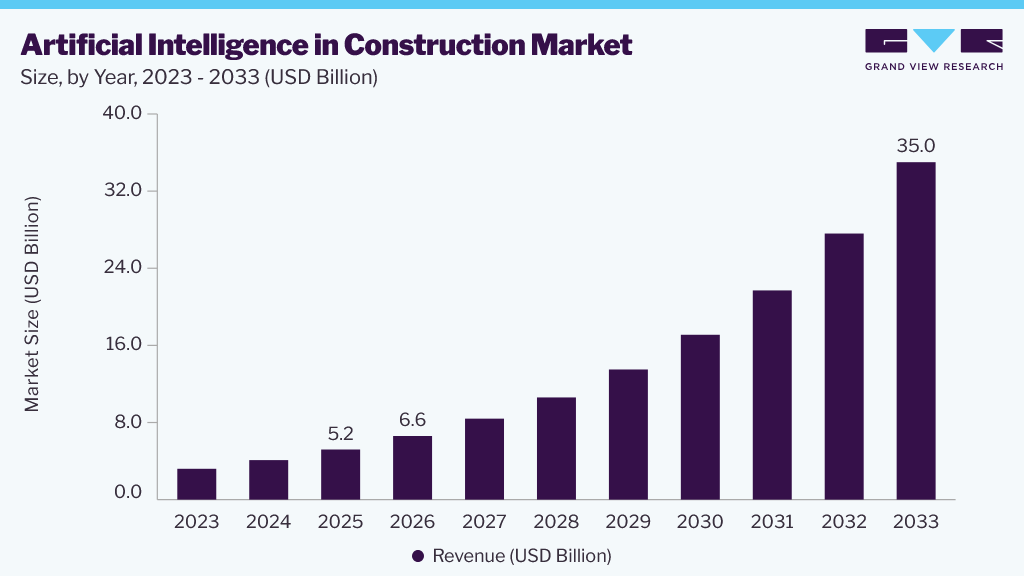
Mordor Intelligence estimates the AI-in-construction market at $12.94 billion in 2026, reaching $27.92 billion by 2031, while Grand View Research projects growth from $6.6 billion in 2026 to $35.0 billion by 2033 (all figures in US dollars). The figures differ because each firm defines the market differently, and they are forecasts, not measured results, but both point to double-digit annual growth.
The Royal Institution of Chartered Surveyors (RICS) surveyed more than 2,200 professionals for its 2025 report on AI in construction, nearly half of them in the UK. Around 45% of respondents reported no AI implementation in their organizations, and only about 12% reported regular AI use in specific processes. Yet the report cites Zacua Ventures' 2025 contech investor survey, in which 56% of investors planned to put more money into AI than the previous year.
In the same RICS survey, a lack of skilled personnel was the most-cited barrier (46%), followed by integration with existing systems (37%) and data quality and availability (30%). McKinsey made a similar point as early as 2018, noting that few engineering and construction firms had the personnel, processes, and tools to implement AI.
Because productivity has barely moved in two decades, even a partial fix carries real weight. McKinsey projects global construction spending rising from $13 trillion in 2023 to $22 trillion by 2040, which makes any tool that closes part of the efficiency gap commercially serious. Knowing how to use AI in construction is likely to matter more as that pressure builds.
Not in any near-term sense. Today's AI tools mostly handle desk-bound and pattern-spotting work: takeoff, scheduling, document review, and hazard detection. The physical trades, where 92% of hiring firms in the AGC survey already struggle to find qualified workers, are not what these tools are built to take over.
Some roles are more likely to shift than disappear. An estimator who once spent much of the week measuring drawings may spend more of it on judgment, bid strategy, and client work, with AI doing more of the measuring. The skill that gains value is checking and interpreting AI output. We look at the same question for design professionals in will AI replace architects.
Yes, within limits. ChatGPT is useful for drafting scopes, summarizing specifications, explaining code language (check it against the adopted code), and organizing meeting notes. It is a general assistant, not a construction tool: project-specific answers require access to the relevant project documents, and it should not be trusted with measurements or quantities; use a purpose-built tool for takeoff. For design-side uses, see our guide to ChatGPT for architects.
Only loosely. ChatGPT can describe a drawing image and read text in it reasonably well. PDFs are less predictable. Per OpenAI's visual retrieval FAQ, image and diagram interpretation in PDFs is limited to ChatGPT Enterprise and to PDFs attached in a conversation; PDFs stored as GPT Knowledge or Project Files use text-only retrieval. Elsewhere, a plan set's drawings may not be analyzed. It also cannot be relied on to judge scale. Purpose-built construction document tools are more dependable, though their output still needs checking.
For a working firm, the honest summary is this: AI in construction is early, uneven, and worth starting on anyway. Because skills and data are the barriers firms cite most, fixing your data and training your people first gives any tool a better foundation.
Pick the slowest, most repetitive part of your week, find the tool category built for it, and trial it on real projects before committing.
And if visualization is your bottleneck, MyArchitectAI is a low-risk place to begin. Try it free with 10 renders and see how much faster a client-ready render can be.